‹‹ Back to SVS Home
Genotype Association Tests
8.1 Genotype Association Tests
Genotype Association Tests Overview
The Genotype Association Tests window offers a straightforward way of testing for genotypic association against either
case/control status or a quantitative trait using one or more statistical measures under any one of several genotype model
assumptions.
In addition, for most genetic models, the Genotype Association Test window offers stratification correction using one or more of the following methods:
- Principal Component Analysis (the “EIGENSTRAT” method)
- Genomic Control
Some tests have variations which use any missing data values you may have in your genotypes as predictors. See the
section Missing Values for a discussion of the subject of including missing values in tests performed by the Genotype
Association Test module.
Genotype Models and Other Genotype Tests
SVS will perform tests based upon one genotype model or other grouping of genotype information. These models and other genotypic tests are as follows:
- Basic Allelic Tests
- Genotypic Tests
- Additive Model
- Dominant Model
- Recessive Model
These tests and models are described below.
Basic Allelic Tests
For a basic allelic test, the genotypes dd, Dd, and DD are resolved into pairs of alleles d and d, D and d, or D and D.
Both elements of each subject’s genotype are considered to correspond to the same value of the dependent variable. The
associations with these individual alleles are then tested.
For example, examine the following case/control dependent variable and genotype variable columns
| Case/Control | Genotype |
| 0 | d_d |
| 1 | D_d |
| 1 | D_D |
would be translated to:
| Case/Control | Allele |
| 0 | d |
| 0 | d |
| 1 | D |
| 1 | d |
| 1 | D |
| 1 | D |
and the following quantitative phenotype dependent variable and genotype variable columns
| Phenotype | Genotype |
| 0.6 | d_d |
| 2.9 | D_d |
| 1.7 | D_D |
would be translated to:
| Phenotype | Allele |
| 0.6 | d |
| 0.6 | d |
| 2.9 | D |
| 2.9 | d |
| 1.7 | D |
| 1.7 | D |
The advantage of this test model is the number of observations has been doubled.
The disadvantage is that the genotype-specific information, such as which alleles are paired together, is
ignored.
A further disadvantage of basic allele testing is stratification correction through the Principal Components Analysis
method is not available for this model.
Genotypic Tests
“Genotypic Tests” refer to testing on the genotypes dd, DD, and Dd without regard to any “order” or allelic count or
allelic pairing they might have.
These tests can reveal associations without regard to any specific genotype model, even while it will not “hide”
associations because of the model being “wrong”.
However, stratification correction through the Principal Component Analysis method is not available for this
model.
Additive Model
Under this model, testing is designed specifically to reveal associations depend additively upon the minor allele –
that is, where having two minor alleles (DD) rather than having no minor alleles (dd) is twice as likely to
affect the outcome in a certain direction as is having just one minor allele (Dd) rather than no minor alleles
(dd).
NOTE:
- For a case/control response, two odds-ratio tests (see Test Statistics) are available under this model. These
tests, which are really not a part of the additive model, as such, are not only indicators of the intensity of any
association, but are also a check on the validity of the additive model itself in describing the effect.
Dominant Model
This model specifically tests the association of having at least one minor allele D (either Dd or DD) versus not having it
at all (dd).
Recessive Model
This model specifically tests the association of having the minor allele D as both alleles (DD) versus having at least one
major allele d (Dd or dd).
Test Statistics
SVS can perform or output results from the following statistical tests where appropriate:
- Correlation/Trend Test
- Armitage Trend Test
- Exact Form of Armitage Test
- (Pearson) Chi-Squared Test
- Fisher’s Exact Test
- Odds Ratio with Confidence Limits
- Analysis of Deviance
- F-Test
- Logistic Regression
- Linear Regression
These are described below.
Correlation/Trend Test
This test (which is not available when missing values are used as predictors) is available for both case/control and
quantitative dependent variables for every genetic model or test except the genotype model.
Also, this is the only test (besides logistic or linear regression) which is available if Principal Components Analysis (PCA)
is used for stratification correction on the input data. See Principal Component Analysis Overview for more
information.
This test will show the p-value for the (possibly PCA-corrected) dependent variable value having any
correlation with or “trend”, which depends on the (possibly PCA-corrected) count value of the genotype. (See
below.)
For case/control dependent variables, and before any PCA correction, a “case” is considered to have a value of one, and a
“control” is considered to have a value of zero.
For the genotype predictor variable, its count values (before any PCA correction) are as follows:
- Additive Model: The count of the minor allele D, which is zero within genotype dd, one within genotype Dd, and two within genotype DD, where d is the major allele.
- Dominant Model: The count is one for genotypes DD and Dd and zero for genotype dd.
- Recessive Model: The count is one for genotype DD and zero for genotypes Dd and dd.
In addition, this test will show a signed correlation value indicating the amount and direction of dependency of the
(possibly PCA-corrected) count value on the (possibly PCA-corrected) dependent variable value.
NOTE:
- In the special circumstance of an additive model where the dependent variable is case/control and there is no Principal Components Analysis correction being done, this test yields p-value results very close to those obtained from the Armitage Trend Test, described below.
See the Formulas and Theories chapter for an explanation of this statistic (Statistics Available for Genotype Association
Tests).
Armitage Trend Test
This test is available specifically under the additive model for a case/control dependent variable when missing data is
dropped.
The test performed is on “case” versus “control” having a “trend”, which depends on the count of the minor allele D,
which is zero within genotype dd, one within genotype Dd, and two within genotype DD.
See the Formulas and Theories chapter for an explanation of this statistic (Section Statistics Available for Genotype
Association Tests).
Exact Form of Armitage Test
This test is available specifically under the additive model for a case/control dependent variable when missing data is
dropped.
This exact test yields the probability under the null hypothesis of having a “trend” at least as extreme as the one
observed, assuming an equal probability of any permutation of the dependent variable. This form, which is more
computationally expensive than is the normal Armitage Trend Test, avoids the chi-square approximation used in that
test.
See the Formulas and Theories chapter for an explanation of this statistic (Section Statistics Available for Genotype
Association Tests).
(Pearson) Chi-Squared Test
The Pearson Chi-Squared test is available for a case/control dependent variable for all genetic models and tests except the
Additive Model, and is available whether missing values are used or dropped.
This test is on the observed contingency table versus the expected contingency table created with all the possible
variations of the selected model in one direction versus the case/control status in the other direction, keeping the margins
constant.
The respective contingency tables and their dimensions when dropping missing values are as follows:
| Genetic Model or Test | Contingency Table and Dimension |
| Basic Allelic Test | (Case/Control) vs. (D/d) a 2 × 2 table |
| Genotypic Test | (Case/Control) vs. (DD/Dd/dd) a 2 × 3 table |
| Dominant Model | (Case/Control) vs. ({DD or Dd}/dd) a 2 × 2 table |
| Recessive Model | (Case/Control) vs (DD/{Dd or dd}) a 2 × 2 table |
If you have chosen Use Missing Values As Predictors, the respective expanded contingency tables and their dimensions become as follows:
| Genetic Model or Test | Contingency Table and Dimension |
| Basic Allelic Test | (Case/Control) vs. (D/d/missing–two missing values |
| are used for every missing genotype) a 2 × 3 table | |
| Genotypic Test | (Case/Control) vs. (DD/Dd/dd/missing) a 2 × 4 table |
| Dominant Model | (Case/Control) vs. ({DD or Dd}/dd/missing) a 2 × 3 table |
| Recessive Model | (Case/Control) vs. (DD/{Dd or dd}/missing) a 2 × 3 table |
See the Formulas and Theories chapter for an explanation of this statistic (Section Statistics Available for Genotype
Association Tests).
Fisher’s Exact Test
The Fisher’s exact test is also available for a case/control dependent variable for all genotype models and tests except the
Additive Model, and is available whether missing values are used or dropped.
This test yields the exact probability under the null hypothesis of having a contingency table at least as extreme as the
one observed, assuming an equal probability of any permutation of the dependent variable. This test, which is
more computationally expensive than the Pearson Chi-Squared test, avoids the chi-square approximation
altogether.
See Test Statistics above for a listing of the possible contingency tables.
See the Formulas and Theories chapter for an explanation of this statistic (Section Statistics Available for Genotype
Association Tests).
Odds Ratios with Confidence Limits
If you have a case/control dependent variable, you are dropping missing data, and you are using any model or test other than the Genotypic Test, you may select to output odds ratios and the lower and upper 95% confidence bounds for each under the following models:
- Basic Allelic Tests: The odds ratio for the minor allele, enhancing the effect, and the odds ratio for the major allele, enhancing the effect.
- Dominant Model: The “normal” odds ratio ({DD or Dd}/dd), where D is the minor allele and d is the major allele) and an inverse odds ratio (dd/{DD or Dd}).
- Recessive Model: The “normal” odds ratio (DD/{Dd or dd}) and an inverse odds ratio ({Dd or dd}/DD).
- Additive Model: The odds ratio for Dd/dd (heterozygous vs homozygous major allele) and the odds ratio for DD/Dd
(homozygous minor allele vs heterozygous).
- NOTE: Under this model, the two odds ratios may be thought of as a check on the validity of the model itself in describing the effect, as well as indicators of the intensity of the association. If the two odds ratios are approximately the same, then the additive model may be considered valid. If the two odds ratios are very different, then there may be some other model better describing the data. For instance, a high and significant odds ratio for Dd/dd and a low or insignificant odds ratio for DD/Dd may indicate the dominant model more accurately describes the effect.
NOTE: An odds ratio is generally considered significant if both the lower and the upper 95% confidence bounds are
greater than one (or both less than one for an odds ratio less than one).
See the Formulas and Theories chapter for an explanation of this statistic (Section Statistics Available for Genotype
Association Tests).
Analysis of Deviance
This test is available for a case/control dependent variable for all genotype models and tests except the Additive Model,
and is available whether missing values are used or dropped.
It is a first-order equivalent alternative statistic for testing an observed contingency table versus the expected contingency
table. The test is created with all the possible variations of the selected model in one direction versus “case” or “control”
status in the other direction.
See Test Statistics above for a listing of the possible contingency tables.
This test has somewhat more theory in its foundation than does the Pearson Chi-Squared test (Test Statistics ) as it is a
likelihood ratio test, to which the Pearson test is a first-order approximation.
See the Formulas and Theories chapter for an explanation of this statistic (Statistics Available for Genotype Association
Tests).
F-Test
This is one of the three tests available for a quantitative dependent variable. (The other two are the correlation/trend test
Test Statistics and Linear Regression Test Statistics.) The F-Test is available for all genotype models and tests except the
Additive Model, and is available whether missing values are used or dropped.
It tests whether the distributions of the dependent variable within each category are significantly different between the
various categories of the predictor variable.
The respective sets of categories when dropping missing are as follows:
| Genetic Model or Test | Categories |
| Basic Allelic Test | D vs. d |
| Genotypic Test | DD vs. Dd vs. dd |
| Dominant Model | {DD or Dd} vs. dd |
| Recessive Model | DD vs. {Dd or dd} |
If you have chosen Use Missing Values As Predictors, the respective expanded sets of categories become as follows:
| Genetic Model or Test | Categories |
| Basic Allelic Test | D vs. d vs. missing–two missing values |
| are used for every missing genotype | |
| Genotypic Test | DD vs. Dd vs. dd vs. missing |
| Dominant Model | {DD or Dd} vs. dd vs. missing |
| Recessive Model | DD vs. {Dd or dd} vs. missing |
See the Formulas and Theories chapter for an explanation of this statistic (Section Statistics Available for Genotype
Association Tests).
Logistic/Linear Regression
When the dependent is a quantitative (real- or integer-valued) trait, linear regression is available for every genetic model
or test except the genotypic model. With linear regression, a line is fit to the response in terms of the predictor’s count value
(see Test Statistics above) according to the genetic model, and a p-value is computed for goodness of fit. The
output will include not only the regression p-value but also the estimate for the intercept and slope of the
regression.
When the dependent is a binary trait, logistic regression is available for every genetic model or test except the genotypic
model. With logistic regression, a logistic (sigmoid) curve is fit to the predictor’s count value, and a p-value is computed for
goodness of fit. The output will include not only the regression p-value but also the estimates for β0 and
β1.
Bonferroni and FDR multiple testing corrections can also be applied to the regression results.
See the Formulas and Theories chapter for an explanation of this statistic (Section Linear Regression and Section Logistic
Regression).
Missing Values
Using Missing Values for Genotypes
Your data may have missing values for some of the genotypes. The default for association testing and stratification
correction is to drop these missing values. However, sometimes it is desirable to test wholly or partly on “predictive
missingness”, that is, what dependency the response may have on missing values. If you wish to include missing values in the
predictions, check Use Missing Values As Predictors.
Note the available statistical tests which use missing values as predictors consist only of the following:
- Chi-Squared Test: Takes a binary (case/control) dependent variable, see Test Statistics.
- Fisher’s Exact Test: Takes a binary (case/control) dependent variable, see Test Statistics.
- Analysis of Deviance: Takes a binary (case/control) dependent variable, see Test Statistics.
- F-Test: Takes a quantitative dependent variable, see Test Statistics.
These test types do not impose anything resembling an “order” on the predictor values, and thus can work with missing
data.
NOTE: No stratification correction is available when including missing data as predictors.
Missing Values in a Case/Control Variable
If you have case/control data with some missing values, SVS version 7 and higher will import this column as “binary”.
Versions before 7 imported this column as “integer”. This ensures all association tests will be available to dependent columns
with missing values.
NOTE: When you use a column containing missing values as a dependent variable, then the rows containing missing
values in the dependent variable will not be used in the analysis.
Multiple Testing Corrections
It may be possible to obtain a good test statistic value by chance alone. Multiple testing corrections are designed to help ensure, if possible, this is not the case. You may optionally select one or more of the following multiple testing corrections.
Bonferroni Adjustment
The Bonferroni adjustment multiplies each individual p-value by the number of times a test was performed. This value,
which is quite conservative, seeks to estimate the probability this test would have obtained the same value by chance
at least once from all the times this test was performed. (The number of times this test was performed will
be equal to the number of bi-allelic markers processed. Other types of tests on the same markers are not
counted.)
False Discovery Rate
The False Discovery Rate (FDR) option calculates the FDR for each statistical test selected. This test is based on the
p-values from the original test.
A general interpretation of the FDR is “What would the rate of false discoveries (false positives) be if I accepted ALL of
the tests whose p-value is at or below the p-value of this test?”
See the Formulas and Theories chapter for an explanation of this correction procedure (Section False Discovery
Rate).
Permutation Testing
Permutation testing is another way of determining if a significant test statistic value was obtained by chance
alone.
NOTE:
- Permutation testing is available only for non-exact tests. (Exact tests already use permutation techniques.)
- Genomic control is not available concurrently with permutation testing. Genomic control works directly on the chi-square results of those tests which incorporate a chi-square statistic. (If you did do permutation testing after applying genomic control, you would get all of the same answers, because genomic control is applied using a constant multiplier on all of the chi-square values.) (See Correcting for Stratification by Genomic Control.)
See the Formulas and Theories chapter for a more detailed explanation and examples of permutation testing. (Section Permutation Testing Methodology).
Principal Components Analysis
To use principal component analysis (PCA) to correct for stratification check the “Correct for Stratification with PCA” box. The PCA options tab will be made available once this box is checked. Correcting a binary dependent variable makes it continuous and thus linear regression and the Correlation/Trend Test are the appropriate tests in this situation.
Overall Marker Statistics
Several types of overall marker statistics and genetic measures may be output along with genotype association test results. These marker statistics are the same as the ones obtained through the separate Genotype Statistics by Marker window, and are detailed in the section Genotype Statistics by Marker.
Using the Genotype Association Test Window
Summary information for the dependent variable and the currently selected genotype model is displayed at the top of this
window for reference. This information is visible from all three tabs in this dialog window.
Data Requirements
Genotype Association Tests require a dataset containing genotype data and either case/control or quantitative trait data.
To use these tests, first import your data into a SVS project (See Importing Your Data Into A Project.) Once you have the
spreadsheet for this data, select the column representing the case/control status or quantitative trait as the dependent
variable (See Column States) and access the Genotype Association Tests options dialog by selecting Analysis >
Genotype Association Tests from the spreadsheet menu.
NOTE:
- It is common practice to inactivate those markers known to have data quality issues before testing, especially if you wish to use PCA.
- If you have case/control data with some missing values, see Missing Values. You can still analyze it as case/control data.
Available Tabs
The genotype association test window consists of three tabs:
- Association Test Parameters: This tab contains all the parameters necessary for the association tests themselves, plus options for selecting principal component analysis for stratification correction of the test input data.
- PCA Parameters: This tab contains all of the remaining parameters for principal component analysis
(PCA).
NOTE:- These parameters are also available in the stand-alone Genotype Principal Component Analysis window. If you wish to perform principal component analysis on your data without performing an association test, see Using the Genotypic Principal Components Analysis Window.
- Overall Marker Statistics: This tab contains the parameters for obtaining overall marker statistics. These statistics
are independent of any association test, other than the fact that most of these statistics will subdivide their results by
overall, cases, and controls if a single case/control variable is the dependent variable. If Genotype Counts is
selected and the dependent variable is quantitative, then the average value for each genotype will be
computed.
NOTE: These parameters are also available in the stand-alone Genotype Statistics by Marker window, see Genotype Statistics by Marker.
The Association Test Parameters Tab
In the Association Test Parameters tab (see Figure 42), select the one genetic model or other test you wish to use,
select whether to include missing values in the analysis, select whether you wish to correct your input data for stratification
through PCA, and select all of the statistical tests you wish to perform.
Optionally you may select multiple-testing corrections to perform for the non-exact statistical tests or to correct for
stratification through Genomic Control.
NOTES:
- The inflation factor will be displayed in the Node Change Log for the Association Results spreadsheet.
- This user interface is dynamic. Making certain choices will change the availability or selections available for other
choices. Specifically, the following restrictions apply:
- Selecting your genetic model, whether to use missing values, and whether to correct your input data through PCA will alter your selection of statistical tests which are available.
- PCA is not available for basic allele tests or genotype tests.
- The additive model is not available when using missing data as predictors.
- Genomic control is not available when using missing data as predictors.
- PCA is not available when using missing data as predictors.
- Genomic control is not available at the same time as permutation testing.
- Genomic control is not available for the genotype model when the dependent variable is quantitative.
If an option is hidden, grayed out or inaccessible, it means a different option or options you have previously selected will not allow the option which is hidden, grayed out, or inaccessible to be simultaneously selected.
- Single Value Permutations and Full Scan Permutations can be run individually or together. You must provide a value for the number of permutations used in the test. When running both types of permutations together, the selected number of permutations is the same for both. The number of permutations should be greater than or equal to three. Permuted P-Values are calculated only for non-exact test statistics.
The PCA Parameters Tab
If you selected to correct for stratification with PCA, you will be able to select PCA parameters from this tab (see
Figure 43).
The principal components can be computed, or if they have already been computed for the dataset, the spreadsheet of
principal components can be selected after selecting the “Use precomputed principal components” option. See
Applying PCA to a Superset of Markers and Applying PCA to a Subset of Samples for specific limitations of this
feature.
The other options include the number of components to be found, normalization method, which, if any, spreadsheets to
output, and whether and how to eliminate component outlier subjects and recompute components. See Principal Component
Analysis Overview for an explanation of the options for this tab.
NOTE:
- The genetic model, selectable in the Association Test Parameters tab, is also a parameter which influences finding the principal components.
The Overall Marker Statistics Tab
Here, you can optionally select to output any of the overall marker statistics available in this tab (see Figure 44). See
Genotype Statistics by Marker for an explanation of the options for genotype marker statistics.
Processing
When you have selected all the tests and outputs you wish to perform, select the Run button to start the selected tests
and correction procedures. While the association test analysis itself is running, you can press the Cancel button on the
progress bar dialog to stop the analysis.
When the tests are completed the output spreadsheet(s) will appear.
Spreadsheet Outputs
These can be as follows:
- The results of the association tests and marker statistics will be displayed in the same spreadsheet. Each of the
statistics calculated will be in its own column. If the original dataset was a marker mapped spreadsheet, this
spreadsheet will have the rows marker mapped.
NOTE: The skipped markers will be excluded in this spreadsheet. - If you requested an output spreadsheet of the PCA-corrected input data, this will be created. The PCA correction of the dependent variable will also be shown.
- If you requested a principal components spreadsheet, this will be created, with rows according to the patient or subject, and columns according to the component. These components will be sorted by eigenvalue, large to small. Only the number of components requested will be shown.
- If you requested an eigenvalue spreadsheet from PCA, it will simply show the eigenvalues from large to small (of the number of components specified).
- If you requested elimination of outlier subjects, and outliers were found, a spreadsheet will be made to list these outliers and the iteration and component in which they were found.
NOTE:
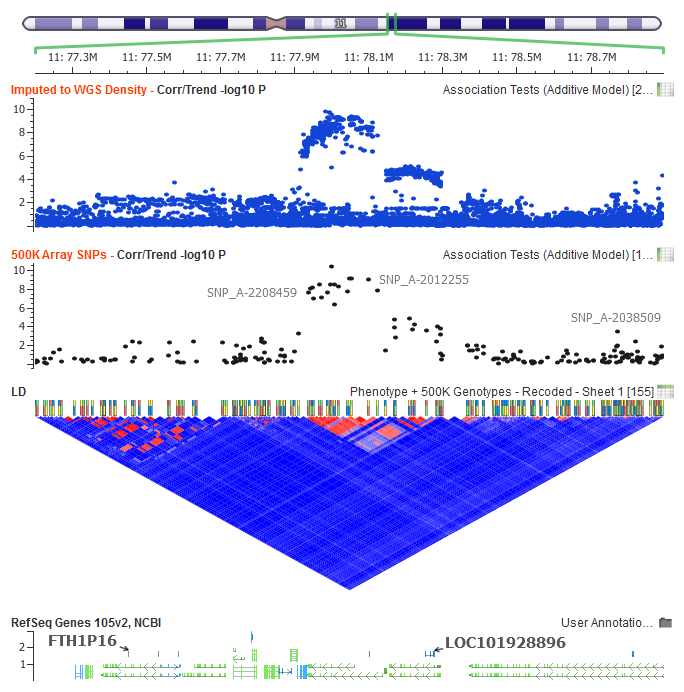
- If you wish to see any outputs in the form of p-value-style plots, you can go to the output spreadsheet and, once there, either plot the individual columns of interest by right clicking on their headers and selecting Plot Variable or going to Analysis > Plot Numeric Columns to create one plot window where all of the output columns are shown in individual graphs. The column’s data will be plotted against its row header names or numbers. If the original spreadsheet was marker mapped then the plot window will become a Genome Browser and Annotation Tracks will be available for examining the results.