Tutorial 3: Detailed Guide to a Standard Case/Control Association Study

2.6.1 Association Demo Overview

A common population-based association study design involves genotyping SNPs in a gene / region of interest in a sample of cases and controls. This guide describes a popular strategy and focuses on the analytical aspects of such studies. It was written as an educational tool largely for people with little or no genetics background.

2.6.2 Discussion of Case/Control Association Studies

Centre for Integrated Genomic Research at the University of Manchester (Edited and reprinted here with their kind permission)

Association

Linkage analysis usually follows the inheritance of markers from one or two generations of a family. Marker alleles along the length of the parental (or founder) chromosomes can only be separated by a recombination event. As this only happens once or twice per chromosome per meiosis, linkage tends to extend for several cMs. Association does not follow inheritance in families, but examines differences in allele frequencies between groups of individuals. As for linkage, the actually functional allele that leads to disease susceptibility does not have to be known, as markers, e.g. SNPs, can be used. The essential difference is that detecting association with marker SNPs depends on the existence of linkage disequilibrium between the marker allele and the disease allele. Markers which are very physically close together will not be separated by a recombination even over several generations. This will lead to haplotypes of sets of marker alleles occurring more often than would be expected by chance. This can be used to detect associations with marker allele albeit over a much smaller distance than would be expected for linkage. Association studies can be performed in unrelated individuals drawn from the population and in families. In this guide we will look at a traditional population-based case control study.

[Picture]

Linkage disequilibrium

  • Take two SNPs A and B with alleles A, a and B, b respectively.
  • Frequency of A = p and a = (1-p)
  • Frequency of B =q and b = (1-q)

If any two alleles from these two markers are observed on the same chromosome they are said to be a haplotype.

Under no association then you would expect to see AB on a haplotype with a frequency of pq.

If the actual frequency of AB is > than pq then alleles A and B from the two SNPs are said to be in positive LD.

As LD extends over very short distances and resources are usually limited, association methods are best suited to the analysis of candidate genes.

[Picture]

Strategy for a genetic association study

  1. Select SNPs through bioinformatics searches
  2. Genotype all SNPs in a subset of the samples
  3. Characterize htSNPs
  4. Genotype htSNPs in whole sample set
  5. Carry out single-point and haplotypic analysis

2.6.3 SNP Selection

Work out how large the gene/ region you wish to study is, e.g. 1Mb. Search through different bioinformatics sites for SNPs in the region. Ideally, you would want to genotype all known SNPs, but due to cost and time constraints you have to prioritize and select a subset. The proposed guidelines for selecting SNPs are:

  1. Select a panel of evenly spaced markers, e.g. 1 SNP every 500 bp. Your SNP spacing will depend on the size of your region and the financial resources available for the project. Remember, however, that a proportion of the selected markers may prove to be monomorphic in the population you are studying (as high as 50% of them) and that you will subsequently be characterizing htSNPs, which can reduce genotyping costs substantially.
  2. If possible, include SNPs that have been validated in a population of the same ethnic origin as the one you are studying.
  3. Cross-reference the databases you are searching in and, if possible, select SNPs that appear in more than one site. This should improve the chances that the marker is truly polymorphic.
  4. If allele frequencies are available, prioritize SNPs with higher frequencies (at least 10%), as these are more likely to prove polymorphic and could capture more variation in the region under study (unless you have good reason to strongly believe that the functional variant is a rare, rather than a common SNP).
  5. If looking within genes, try to select possible functional polymorphisms, e.g. in exons / regulatory regions of the gene. This approach will maximize your chances of targeting the true disease variant! However, remember that there is increasing evidence for regulatory SNPs residing within introns or even several kilobases upstream of the transcriptional / translational start sites of genes.
  6. Review the recent bibliography on the gene / region you are interested in. You may want to select SNPs that have been associated with other complex diseases of similar aetiology or capitalize on other people’s efforts to characterize the genomic architecture of the region.
  7. When investigating highly polymorphic regions, be aware that SNPs localizing very closely upstream or downstream of your selected markers may interfere with the efficiency / accuracy of the genotyping platform you will be using, e.g. polymorphisms within primer / probe sequences may lead to invalid genotype calls.

2.6.4 First Stage of Genotyping

You have now constructed a panel of SNPs that you wish to target. It is important to use a genotyping platform that offers high accuracy, as genotyping errors are more difficult to unequivocally detect in population-based association studies. If undetected, such errors will have an impact on downstream analysis and on the interpretation of results. It is assumed that you have carefully selected cases and controls, at least making sure that the controls are drawn from the same population as the patients. Population stratification can also lead to misinterpretation of results. It is also assumed that you will be studying a few hundred cases and a few hundred controls.

Genotype all SNPs in at least 96 control samples. This will allow you to carry out initial genotype quality control analysis and to characterize haplotype tagging SNPs, i.e. the minimum number of SNPs required in order to capture the majority of the variation in the region under study. You may wish to genotype an additional set of 96 patient samples, in order to carry out initial association analysis to help you enrich your list of htSNPs that will be subsequently genotyped in the full sample set. If typing both cases and controls at this stage, try to combine diseased and healthy individuals’ samples in the same plate. Call your genotypes conservatively. It is better to have missing data, rather than erroneous data. Compare your allele and genotype frequencies against published reports to identify any gross inconsistencies. You are now almost ready to start analyzing!

Most analyses will include:

  • Checking for deviation from Hardy Weinberg equilibrium,
  • Calculating pairwise LD measures for SNPs within a gene / region,
  • Estimating haplotype frequencies,
  • Identifying haplotype tagging SNPs,
  • Carrying out single-point analysis,
  • Calculating and comparing haplotype frequencies between cases and controls.

2.6.4.1 Importing Your Data

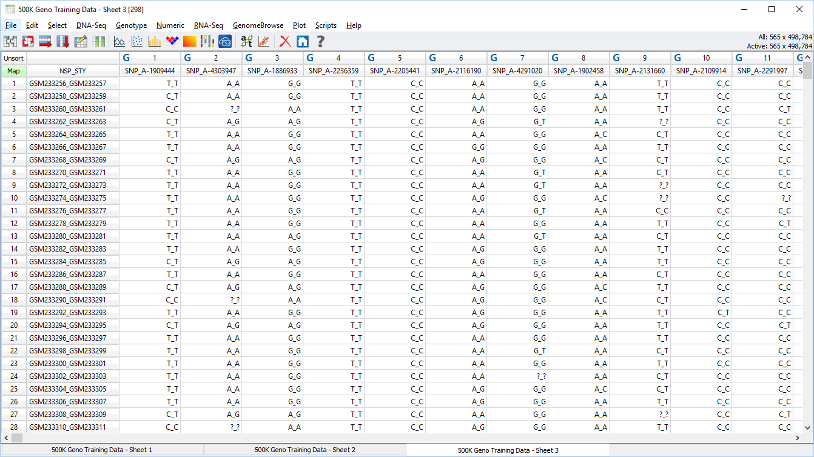
Start by formatting your data for HelixTree as detailed below. For details about importing data, see chapter 4. The HelixTree input file should contain the following fields (at least 4):

  • Field 1: This column should contain a unique identifier for each typed sample and is for your reference only.
  • Field 2: This field should be 1 if the genotyped individual is a case and 0 if it is a control, even if you are only including cases or controls.
  • Field 3: This field should contain the genotype of marker 1
  • Field 4: This field should contain the genotype of marker 2
  • Field 5: Etc…

The genotypes should be in the following format: Allele1_Allele2 Allele names can be numbers or letters, for example A_G or 1_2 etc. Missing data should be coded as ? or ?_? and not as 0, or X or blank cells. Order your SNPs in the file in the order they appear in the gene / region you are studying. The file should have a header row. The file should not include any spaces. Save your file as a text file.

Example of a HelixTree genotype file:

[Picture]

You will initially use HelixTree to check for deviation from Hardy-Weinberg equilibrium (HWE) and for linkage disequilibrium (LD) between pairs of the genotyped SNPs in the control samples. If you have also genotyped a set of cases, you will check for HWE and LD in the cases separately. You can then carry out initial association analysis in HelixTree by inputing a file that contains both cases and controls. Here is how to use it: First, we assume you have already created a new project file and are ready to import your data. You have saved your input file as a text file, so you need to convert it into HelixTree format. In the project navigator, click on >File, >Import Data, >Import ASCII file.

[Picture]

The following window should come up:

[Picture]

  • Click on the "Choose" button to select the input file.
  • Select the appropriate formatting settings in the import dialog
  • Click OK.

2.6.4.2 Checking For Deviation from HWE

To check for HWE make sure you have opened Sheet 1 which should be listed in the Project Navigator window.

  • Click on the "Genetics" menu and select "HWE Plot (Uniform Scaled)".

[Picture]

The resulting window will graphically summarize HWE for all of your markers. The graphical output will list the genotyped SNPs on the x-axis and the -log 10p (negative log base-10 of the p value) on the y-axis. [For your reference, a p value of 0.05 corresponds to a -log 10p of 1.30].

[Picture]

As the diagram may be difficult to interpret, you should Summarize All Data and examine the p values to make sure they are all non significant (p>0.05). In the Summarize All Data view you can sort by clicking on the column headers.

To view the results in a table:

  • Click on "File".
  • Click on "Summarize All Data".

Example of a HelixTree HWE results table:

[Picture]

If your sample group significantly deviates from HWE, you should go back and recheck your genotype calls. It is possible that deviation from HWE is caused by random chance (particularly a problem with multiple testing of many SNPs), non-random mating, or selection forces acting on the locus under study. However, it is more likely that something has gone wrong when genotyping the SNP. You can double check by sequencing or genotyping a few samples by a different method.

For details about finding HWE in HelixTree, see chapter 15.

2.6.4.3 Calculating Pairwise LD

Apart from comparing your results with published allele / genotype frequencies and checking for HWE, examining LD patterns can also provide a hint for possible genotyping errors. If the region you are studying is large and you can detect LD between pairs of SNPs that reside far away from each other, you should consider rechecking their genotype calls, especially if the region is not characterized by strong LD. LD between distant markers could be real, but could also indicate genotyping error or mismapping of the markers.

You can now check for LD among your SNPs. Exactly as for HWE, check for LD in the cases (if genotyped) and controls separately. An easy way to separate out the cases and controls, is to sort on the Case/Control column by clicking on the upper column header, then de-selecting all of the rows that have a one (alternately zero) in the Case/Control column. You can toggle your selection using the Invert Selection submenu of the spreadsheet menu.

After having opened your Sheet 1 in HelixTree and selected an appropriate subset,

  • Click again on "Genetics"
  • And then "LD Plot (Uniform Scaled)".

Your SNPs will be plotted equidistantly on both axes.

[Picture]

To export your results,

  • Click on "File"
  • And then on "Summarize Data For All Points to CSV File".

You can now open this exported file in Excel. Here is an example of an exported file:

[Picture]

HelixTree has provided you with a table summarizing LD statistics between pairs of markers. D prime is a widely used measure of LD, but can be overestimated with small sample sizes and / or rare allele frequencies, therefore giving the false impression of strong apparent LD. You should preferably use the LD correlation R measure, as it is believed to give a more accurate estimate of pairwise LD. The p value output in the table is not a measure of strength of LD, but rather an indication for the significance of the evidence for the presence of LD.

The algorithm you will subsequently be using to estimate haplotype frequencies [the expectation-maximization (EM) algorithm] assumes HWE and the presence of LD. Therefore, if your HelixTree LD plot looks more white than pink/red, you should refrain from carrying out haplotypic analysis for the whole region. You can always just estimate haplotype frequencies for a subset of markers that are in LD with each other. There is no strict LD correlation R threshold for deciding whether SNPs are in LD or not. Generally, anything over 0.4 should be fine. However, if you want to include SNPs that demonstrate lower levels of LD than this, you should make sure that the haplotype estimation algorithm has converged by running it several times through the Haplotype Frequency Estimation with different random starting values.

For details about finding LD in HelixTree, see chapter 14.

2.6.4.4 Estimating Haplotype Frequencies

HelixTree can provide you with the estimated haplotype frequencies. Remember to estimate haplotype frequencies in cases (if genotyped at this first stage) and controls separately.

  • Open the appropriate Sheet 1 in HelixTree, as detailed above.
  • Click on the "Genetics" menu and select "EM Haplotype Frequency Estimation".
  • In the resulting window, select the set of SNPs that you want to estimate haplotypes for and then click on "ALL PATIENTS" in the Patient ID list to select everyone in your file.
  • Then click on the "Compute EM" button and the estimated haplotype frequencies will appear in the right hand side space.

You can copy the resulting inferred haplotype frequencies and paste them into a program, such as Excel. You should examine the haplotype frequencies resulting from the EM algorithm and not from the composite haplotype method (CHM).

Example of haplotype frequency estimate results:

[Picture]

Remember to re-initialize the EM algorithm at least 3 times with different random starting probabilities to ensure that you are getting the same results, making sure that the estimated haplotype frequencies are identical (or nearly identical) and that the order of the haplotypes are the same. You can do this by clicking on the "Re-Initialize" button, after you have run the EM algorithm for the first time.

[Picture]

If the algorithm is giving you disparate results, you have probably included markers that are not in LD or out of HWE and should recheck / rerun your previous analysis.

For details about haplotype frequency estimation in HelixTree, see 19.

2.6.5 Characterizing htSNPs

HelixTree currently offers the Carlson method for finding haplotype tagging SNPs (htSNPs). To pick tagging SNPs in HelixTree:

  • Format your data for HelixTree as described above (2.6.4) and activate Sheet 1
  • From the spreadsheet view, select Scripts->Genetic->Pick Tagging SNPs

[Picture]

  • Select the desired parameters for minimum allele frequency, LD threshold, and marker separation window

[Picture]

The resulting spreadsheet will have only the tagging SNPs activated and the other columns deactivated.

We look forward to offering other methods in future releases. There are programs such as the htSNP2 program, as implemented in Stata that also offer haplotype tagging features. Many programs for htSNP characterization have become available and continue to emerge. It is not yet clear which one performs best, or whether they produce different results.

2.6.6 Second Stage of Genotyping

You can now genotype the selected haplotype tagging SNPs in your entire sample set. Try to combine patient and control samples in the plates you use for genotyping. As before, call your genotypes conservatively. After having completed the second round of genotyping, you can reevaluate deviation from HWE and examine LD patterns over the gene / region under study in cases and controls separately.

Follow the instructions given for the first stage of genotyping (2.6.4) to find deviation from HWE and examine LD patterns.

2.6.7 Looking for Associations with Disease

For details about tree analysis in HelixTree, see chapter 7.

2.6.7.1 Finding Single-Point Associations

Prepare a data set for HelixTree using the instructions described above (2.6.4) and make sure Sheet 1 is active. You will initially investigate any single-point associations.

  • Click on the spreadsheet column detailing case/control status to mark it as the dependent variable. Dependent variables are noted by a magenta color.
  • Click on "Analysis" and then "Interactive Tree Analysis".

[Picture]

  • Right-click in the white box and then
  • Click on "Manual Split"

[Picture]

You can copy the resulting table and paste it in Excel, saving it for future reference. Example of output table:

[Picture]

The columns that you are interested in are: P, FDR, bP, Splitter and Split Rule. P is the uncorrected, unadjusted p value calculated as a chi square test, FDR is the False Discovery Rate for all splits whose adjusted p value is less than or equal to the adjusted p value of this variable’s split, bP is the Bonferroni corrected p value and the Splitter is the variable (the SNP) that splits the data. The Split Rule shows how the predictor (the SNP) splits the data.

In the example above, not carrying the 0 allele for marker32 is most significantly associated with having the disease (p=0.000236), before applying the Bonferroni correction for multiple testing. The Bonferroni correction is conservative, especially when studying multiple loci that are in LD with each other (non-independent tests). Alternative methods of correcting for multiple testing are sometimes used, including the false discovery rate method (FDR) and running permutations to obtain an empirical p value. FDR has now been implemented in HelixTree, while you can also resample p-values on any given split.

2.6.7.2 Compare Haplotype Frequencies

You can now compare haplotype frequencies between your cases and controls (provided you have determined that the SNPs are in HWE and in LD in each group separately). You can examine moving haplotype windows of varying lengths.

  • Make sure the spreadsheet column detailing case/control status is the dependent variable. Dependent variables are noted by a magenta color.
  • In the spreadsheet menu click on "Analysis"
  • Select "Interactive Tree Analysis".
  • In the menu of the new tree view, click on "Tree"
  • Select "Tree Options".

[Picture]

In the options window (depicted above):

  • make sure the box "Use missing values as predictors [impute missing data for HTR]" is not checked.
  • check the "Haplotype Trend Regression" box.
  • In the "Marker window size" box, type the number of SNPs you want to analyze simultaneously.

If you type in 1, then the resulting analysis will be equivalent to allele-wise single- point analysis. If you type in 2, then HelixTree will analyze 2-point haplotypes in cases and controls, starting with the first 2 SNPs in the region and then moving along in windows of 2 markers. The maximum number you can type in this box is the number of SNPs you have genotyped in the region of interest.

  • Click the "OK" button in the tree options window.
  • You can now go back to the previous window, right-click on the white box (as you did for single-point analysis) and
  • Select "Manual Split" again.

[Picture] [Picture]

Copy and paste the resulting table into Excel and save it for future reference. It is important to replicate any positive findings through different genetic analysis packages. In addition, if you identify significant single-point or haplotypic associations with the disease of interest, you can use a package, such as Stata, to characterize the magnitude of the genetic effect by calculating odds ratios. You are now ready to write your paper. Good luck!